Joomla! 1.5 Beta-2 is out! Template parameters.
On May 4th/5th (depending on your timezone), the Joomla! dev' team finally released the much anticipated beta-2 of the upcoming 1.5 version. This release is more for designers and coders to adapt their code to the new framework, but everyone is invited to test and report bugs so as to speed up release of RC and stable versions. Check out the official announcement.
I'll post some of the new features and comparisions of 1.0.x and 1.5 side by side.
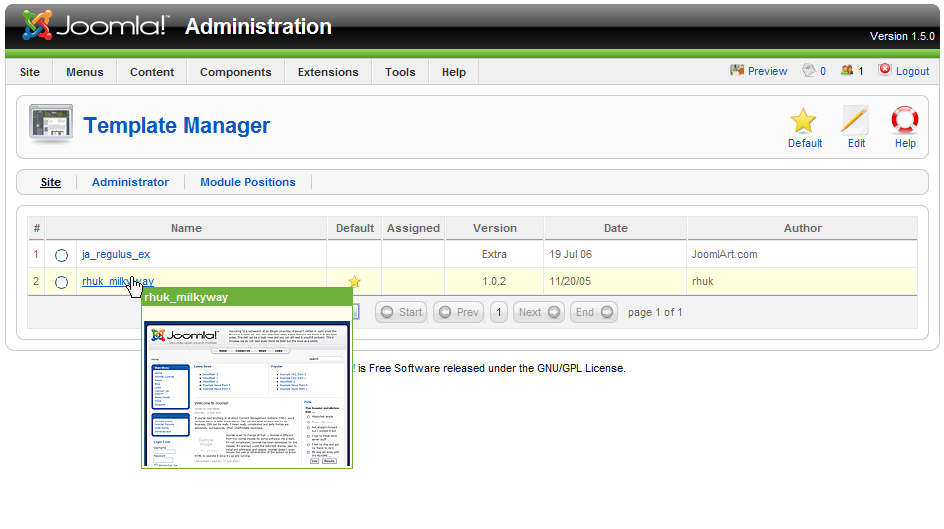
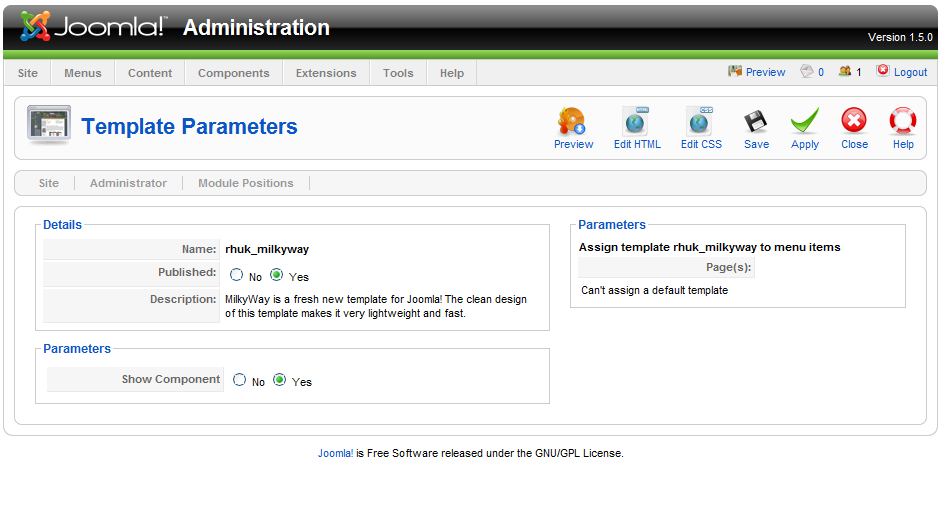
To start with, if you're a designer, you'll want to take a look at the default's Milky Way template parameters and how they are coded. In the administration backend, as you can see below, all the user has to do is set Color and or Background variation, Save, and the look of the site changes instantly!
Now I'd like a way to do this on a per-section/category/item basis.. (is there?)
Also note there's a second template, BEEZ, shipping with this release. Check it out, read the documentation provided for it, it is great for accessibility! (not shown)

I'll post some of the new features and comparisions of 1.0.x and 1.5 side by side.
To start with, if you're a designer, you'll want to take a look at the default's Milky Way template parameters and how they are coded. In the administration backend, as you can see below, all the user has to do is set Color and or Background variation, Save, and the look of the site changes instantly!
Now I'd like a way to do this on a per-section/category/item basis.. (is there?)
Also note there's a second template, BEEZ, shipping with this release. Check it out, read the documentation provided for it, it is great for accessibility! (not shown)

Labels: 1.5, beta, configuration, joomla 1.5 beta, screenshot, templates, user interface
posted by eyez at 10:52 AM
2 comments


 Add site to your feeds.